

Documentation Index
Fetch the complete documentation index at: https://docs.blueberrysocial.com/llms.txt
Use this file to discover all available pages before exploring further.
Overview
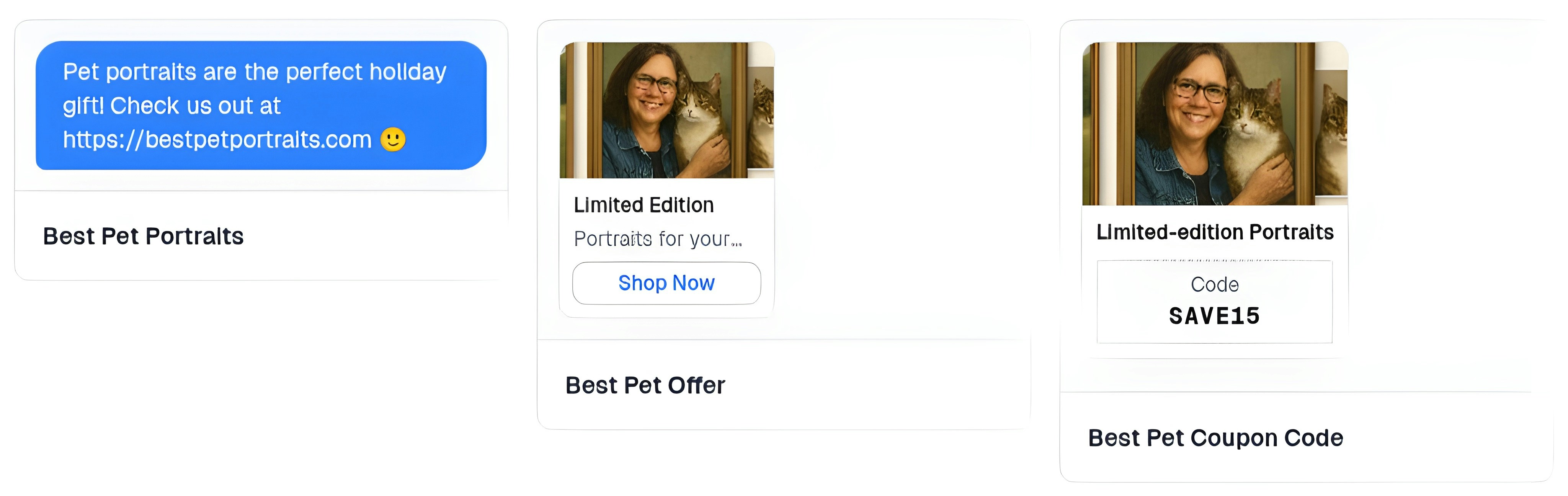
Saved Offers are reusable promotional templates that you can quickly insert into DM campaigns. Build a library of discount codes, media promotions, and text offers to streamline campaign creation and maintain brand consistency.Offer Types
Blueberry supports three types of DM offers:Text Offers
Simple text-based messages with links to your products or services.
Media with Buttons
Rich media with interactive call-to-action buttons like “Shop Now”.
Discount Codes or Limited-Time Offers
Discount codes or limited-time offers with promotional images and text.
Creating a Saved Offer
Choose Offer Type
Select the type of offer you want to create:
- Text Offer - Simple message with link
- Media with Buttons - Image/video with CTA button
- Coupon Code - Discount code with promotional content
Configure Offer Content
- Text Offer
- Coupon Code
- Offer Name - Internal reference (e.g., “Holiday Sale Link”)
- Message Text - The message users will receive
- Link URL - Where the link directs users
- Link Text - Display text for the link (optional)
Previewing Offers
Before using an offer in a live campaign, you can preview how it will appear to users.- Send Test Message
- Preview DM Ad
Send a test version of the offer to yourself or a team member to see exactly how it appears in DMs.
FAQ
Do I need to create discount codes in my store first?
Do I need to create discount codes in my store first?
For coupon code offers, yes. Create the discount code in your e-commerce platform (Shopify, WooCommerce, etc.) first, then create a matching saved offer in Blueberry.
Can I track who redeemed my offers?
Can I track who redeemed my offers?
Currently, you can track redemptions through your e-commerce platform’s analytics by monitoring discount code usage.Cross-reference with Blueberry campaign metrics to see which campaigns drove the most redemptions.
What image sizes work best for media offers?
What image sizes work best for media offers?
Recommended sizes:
- Square: 1080x1080px (best for product showcases)
- Vertical: 1080x1920px (full-screen mobile experience)
- Horizontal: 1920x1080px (landscape content)
Can I personalize offers for each recipient?
Can I personalize offers for each recipient?
Not yet, but this feature is coming soon. For now, offers are the same for all recipients of a
campaign.
Related Pages
Campaign Types
Learn about conversion campaigns and how to use saved offers effectively.
Campaign Triggers
Set up triggers to automatically send offers when users show interest.